×
- Hello
- Login or Register
- Quick Links
- Live Chat
- Track Order
- Parts Availability
- RMA
- Help Center
- Contact Us
- Shop for
- Nissan Parts
- Nissan Accessories

My Garage
My Account
Cart
This part fits
1997 Nissan Pathfinder
Check another vehicle- Production Date: 07/1996-12/1998
- Fitting Vehicle Options: V + W. (FED. 2WD+ CAL. 2WD), W. (FED. 4WD + CAL. 4WD)
Nissan 47605-C9900 Relay Assy-Actuator
1996-2008 Nissan 47605C9900
Customer Questions & Expert Answers (3)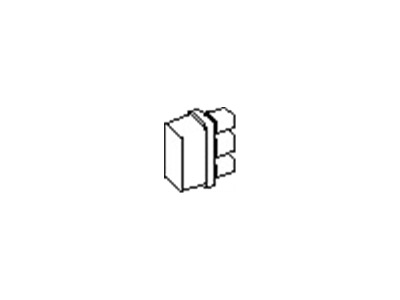
- Part DescriptionRelay Assy-Actuator
- Lookup Code47605
- ManufacturerNissan
This part fits
1997 Nissan Pathfinder
Check another vehicle- Production Date: 07/1996-12/1998
- Fitting Vehicle Options: V + W. (FED. 2WD+ CAL. 2WD), W. (FED. 4WD + CAL. 4WD)
$244.81 MSRP: $345.78
You Save: $100.97 (30%)
Ships in 1-3 Business Days
1
- Related Parts
- Specifications
- Q&A
Product Specifications
Brand Genuine Nissan Lookup Code 47605 Manufacturer Part Number 47605-C9900 Part Description Relay Assy-Actuator Other Names Modulator Relay, Relay, Relay Assembly Manufacturer Note F/ABS Item Dimensions 4.0 x 3.8 x 1.9 inches Item Weight 0.60 Pounds Condition New Fitment Type Direct Replacement Manufacturer Nissan SKU 47605-C9900 Warranty This genuine Nissan part is guaranteed by Nissan's factory warranty. Shipping & Return Shipping Policy Return Policy Warning: California's Proposition 65Customer Questions & Expert Answers
- Q:I would like to verify that part given Posted by NissanPartsDeal Specialist
- A:You can Select Your Vehicle to check if 47605-C9900 fits your vehicle.Posted by NissanPartsDeal Specialist
Installation and Repair Tips- Q:What is the purpose of relays on Nissan Pathfinder's electrical system? Posted by Customer
- A:Several electrical accessories in the vehicle, such as the fuel injection system, horns, starter, and fog lamps use relays to transmit the electrical signal to the component. Relays use a low-current circuit (the control circuit) to open and close a high-current circuit (the power circuit). If the relay is defective, that component will not operate properly. Most relays are mounted in the engine compartment fuse/relay boxes, with some specialized relays located above the interior fuse box. The covers of the engine compartment relay boxes have a printed key to identify the relays. There are also several relays located above the interior fuse box. If a faulty relay is suspected, it can be removed and tested using the procedure below or by a dealer service department or a repair shop. Defective relays must be replaced as a unit. If you can't determine the correct connection from the wiring diagrams, however, you may be able to determine the test connections from the information that follows. There are six basic types of relays used on these models. Some are normally open type and some normally closed, while others include a circuit of each type. On most relays, two of the terminals are the relay control circuit. The other terminals are the power circuit. Some relays may be marked as an aid to help you determine which terminals are the control circuit and which are the power circuit. To test a relay connect an ohmmeter across the two terminals of the power circuit, continuity should not be indicated. Now connect a fused jumper wire between one of the two control circuit terminals and the positive battery terminal. Connect another jumper wire between the other control circuit terminal and ground. When the connections are made, the relay should click and continuity should be indicated on the meter. On some relays, polarity may be critical, so, if the relay doesn't click, try swapping the jumper wires on the control circuit terminals. If the relay fails the above test, replace it.Posted by NissanPartsDeal Specialist
- Additional Installation and Repair Tips by AI Expert
- Removal steps 1. Park on level ground, place transmission in Park (or neutral with parking brake set), remove key, and wear safety glasses and gloves. 2. Turn off all electrical accessories and, if applicable, remove the fuse/relay box cover to expose relays. 3. Disconnect the negative battery cable and isolate it to prevent accidental reconnection. 4. Identify the relay and note its orientation and connector arrangement; take a photo or label the connector for reference, since layouts commonly vary. 5. If required, remove any trim or fasteners that block access to the relay housing - methods differ by design. 6. If the relay is a plug-in type, grasp the relay body (not the wires) and pull it straight out; if retained by a clip, release the clip before removing. If the relay is soldered or part of a sealed module, stop and obtain vehicle-specific instructions or professional service. 7. Inspect the relay socket and wiring for corrosion, melted plastic, or loose terminals; clean lightly with electrical contact cleaner if needed and allow to dry. Installation steps 1. Verify the replacement relay matches the original in pin layout and function before installation. 2. Inspect and, if necessary, clean the relay socket; replace the socket or wiring if terminals are damaged or corroded. 3. Position the relay in the correct orientation and push it straight into the socket until fully seated; re-secure any retention clips or module fasteners. 4. Reinstall any access panels or fuse/relay box covers that were removed. 5. Reconnect the negative battery cable and tighten it securely by hand tools. 6. Turn the ignition to accessory or start the engine and operate the affected circuit(s) to confirm proper relay function; cycle the system several times and verify related fuses are intact. 7. Check for unusual heat, smells, or intermittent operation and recheck connections if any abnormalities appear. Repair tip 1. Photograph the relay and connector before removal and keep a small container for fasteners - it saves time and prevents orientation or hardware errors.
- Q:
Why choose Nissan Parts Deal
- Dedicated Service
Your complete satisfaction is our #1 goal
- Lowest Prices
Best deals on genuine OE parts from dealerships
- Fast Delivery
Orders are processed and delivered promptly